Do Dash Cams Record When the Car Is Off? Complete Guide
Yes, dash cams record when the car is off, but only when the dash cam has a constant power source and parking mode turned on.

Published • read
Table of Contents
Do Dash Cams Record When the Car Is Off? Complete Guide
Section titled Do%20Dash%20Cams%20Record%20When%20the%20Car%20Is%20Off%3F%20Complete%20GuideYes, dash cams record when the car is off, but only when the dash cam has a constant power source and parking mode turned on. A dash cam plugged into the cigarette lighter socket shuts down with the ignition. A dash cam connected through a hardwire kit, an OBD-II cable, or a dedicated battery pack keeps watching the parked car.
Recording with the car off is called parking mode. In parking mode, the dash cam stops recording non-stop and waits for a trigger. There are 4 main parking mode types: motion detection, impact (G-sensor) detection, time-lapse recording, and Ultra-Low Power Saving Mode on the BlackVue ELITE Series.
Recording with the car off gives drivers 3 main benefits: video evidence of hit-and-runs, a record of vandalism and break-ins, and footage for insurance claims and police reports. Drivers in Australia use parking mode in shopping centre car parks, airport long-term parking, apartment garages, and on the street overnight.
A dash cam that records with the car off has 4 main parts:
- Power source: a hardwire kit wired to the fuse box, an OBD-II cable, or a battery pack.
- Voltage cut-off: a setting that shuts the camera down before the car battery drops too low.
- Sensors: an accelerometer (G-sensor) for impacts and image-based motion detection.
- SD card: the memory card that stores event files and loop recordings.
This guide covers how dash cams work with the car on and off, the 3 power scenarios, each parking mode, how long a dash cam records while parked, and the main dash cam recording modes.
Do Dash Cams Record All the Time?
Section titled Do%20Dash%20Cams%20Record%20All%20the%20Time%3FNo, dash cams do not record all the time. A dash cam records non-stop only while the car is running, and switches to parking mode or shuts down when the car is off. Non-stop recording 24 hours a day drains a car battery within a day or two, so no dash cam runs at full recording around the clock.
While driving, the dash cam records every second of the trip. When the memory card fills up, loop recording overwrites the oldest files. Event files, such as clips saved by the G-sensor after a crash, stay locked and protected from overwriting.
With the car parked, a dash cam set up for parking mode sleeps or records at low intensity. The dash cam wakes up and saves a clip when a sensor detects motion or an impact.
Do Dashcams Record When the Car is Off?
Section titled Do%20Dashcams%20Record%20When%20the%20Car%20is%20Off%3FYes, dashcams record when the car is off, if the dashcam is hardwired, connected to an OBD-II cable, or running from a battery pack, with parking mode enabled. A dashcam powered through the cigarette lighter socket stops recording the moment the ignition turns off in most cars.
Dashcams that record when the car is off are not “always on” in the full sense. There are 3 reasons a parked dashcam limits recording:
- Battery protection: full recording drains the car battery, so parking mode cuts power use.
- Storage: event-based clips use far less SD card space than hours of non-stop video.
- Review time: short event files are faster to check than hours of empty car park footage.
A parked dashcam detects movement or impact with built-in sensors. When a sensor triggers, the dashcam wakes up and records the event, such as a scrape, a break-in attempt, or a door ding.
How Dash Cams Work When the Car Is On
Section titled How%20Dash%20Cams%20Work%20When%20the%20Car%20Is%20OnWith the car on, a dash cam draws power from 1 of 3 sources and records non-stop. The 3 power sources are:
- Cigarette lighter socket (12V outlet): the simplest connection, live only while the ignition is on in most cars.
- USB-C connection: a direct plug-in on newer vehicles with USB-C accessory ports.
- Hardwire kit: a cable wired straight to the vehicle’s fuse box.
With all 3 sources, the dash cam records the front camera, the rear camera (on 2-channel models), audio, GPS data, and a time stamp. Loop recording overwrites the oldest non-event files when the SD card fills up.
What Happens When You Turn the Car Off?
Section titled What%20Happens%20When%20You%20Turn%20the%20Car%20Off%3FThe dash cam’s power source decides what happens when the car turns off. The 3 scenarios below cover every common setup.
Scenario 1: Cigarette Lighter Socket Power
Section titled Scenario%201%3A%20Cigarette%20Lighter%20Socket%20Power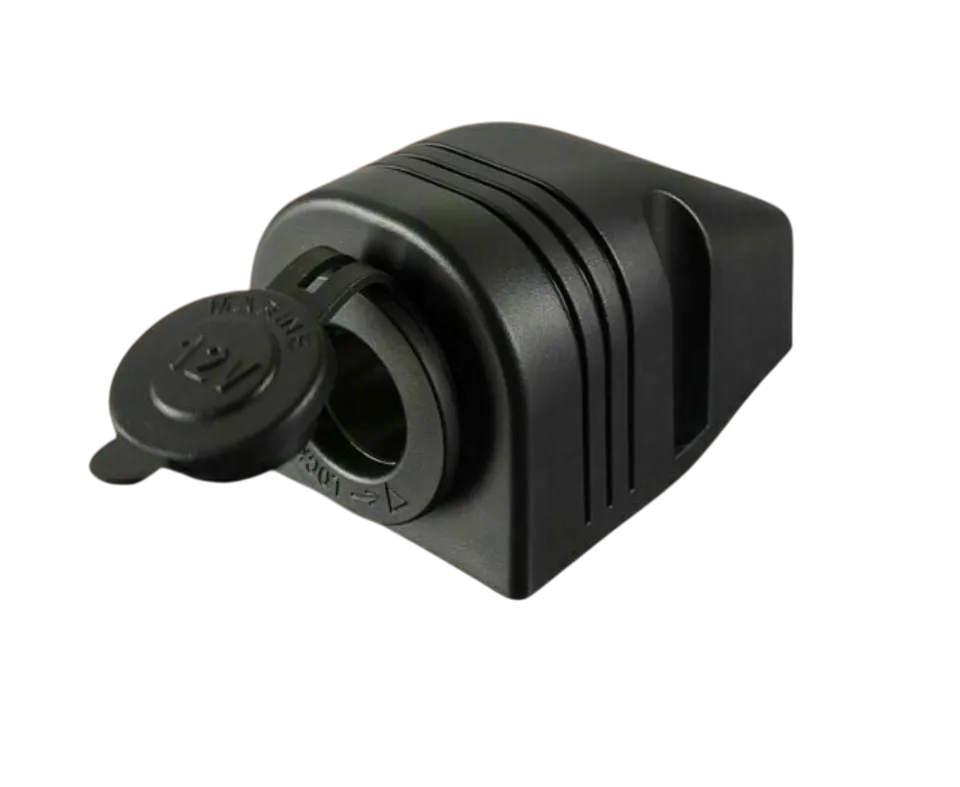
With cigarette lighter socket power, the dash cam switches off with the ignition. Most 12V sockets cut power the moment the engine stops.
Result: no parking mode, no recording, and no protection while the car is parked.
Some vehicles keep the 12V socket live with the ignition off. A dash cam on an always-on socket keeps running, but without a voltage cut-off the dash cam drains the car battery. Unplug the dash cam, if your car’s cigarette lighter stays on after the engine stops.
Scenario 2: Hardwire Kit or OBD-II Cable
Section titled Scenario%202%3A%20Hardwire%20Kit%20or%20OBD-II%20CableWith a hardwire kit or the BlackVue OBD-II Power Cable, the dash cam keeps recording with the car off. A hardwire kit connects to 2 fuses in the fuse box:
- Constant fuse (BATT+): a fuse with power at all times, which runs parking mode.
- ACC fuse: an ignition-switched fuse, which tells the dash cam when the engine turns on or off.
The OBD-II cable plugs into the car’s OBD-II diagnostic port under the dashboard and needs no fuse taps. With either cable, the dash cam detects the ignition turning off and switches to parking mode. The built-in voltage cut-off shuts the camera down before the car battery drops below a safe level. Common cut-off settings for 12V cars sit between 11.6V and 12.4V.
Result: the dash cam keeps watching the parked car, powered by the car battery.
Scenario 3: Dedicated Battery Pack
Section titled Scenario%203%3A%20Dedicated%20Battery%20PackWith a dedicated dash cam battery pack, the dash cam runs on the pack’s own charge while parked. Popular battery packs in Australia include the Cellink NEO 80+S, the Cellink NEO6 Slim, and the BlackVue B-130A Ultra. The battery pack charges while you drive and powers parking mode after the engine stops. The car battery stays untouched.
Result: extended parking mode protection with zero drain on the car battery.
In parking mode, a dash cam records in 1 of 4 ways, depending on the model and settings.
Motion Detection
Section titled Motion%20DetectionMotion detection starts recording when something moves in the camera’s field of view. A person walking past, a car pulling into the next bay, or a hand on the door handle triggers an event file. Motion detection catches the lead-up to many incidents, but trees, rain, and passing traffic cause false triggers on busy streets.
Impact / G-Sensor Detection
Section titled Impact%20%2F%20G-Sensor%20DetectionImpact detection starts recording when the G-sensor feels a physical hit on the vehicle. The G-sensor is an accelerometer inside the dash cam. A car reversing into the bumper or a trolley hitting the door triggers a recording straight away. Impact detection uses less power than motion detection and ignores movement that does not touch the car.
Time-Lapse Recording
Section titled Time-Lapse%20RecordingTime-lapse recording captures video non-stop at a low frame rate, usually 1 frame per second (1 fps). Hours of parking footage compress into small files. Time-lapse suits long parking periods, where the goal is a full record without filling the SD card.
How Long Will a Dash Cam Record When the Car Is Off?
Section titled How%20Long%20Will%20a%20Dash%20Cam%20Record%20When%20the%20Car%20Is%20Off%3FA dash cam records with the car off for anywhere from a few hours to several weeks. The runtime depends on 3 factors: the parking mode type, the power source, and the camera’s power draw. Battery age and ambient temperature change runtime too, and hot Australian summers shorten it.
| Setup | Typical parking runtime |
|---|---|
| Standard parking mode + hardwire kit | Several hours to about 1 day |
| Ultra-Low Power Saving Mode (BlackVue ELITE Series) + hardwire kit | Several days to 1 week or more |
| Standard parking mode + Cellink NEO 80+S or BlackVue B-130A Ultra | 1 to 2 days |
| Power Saving Mode + Cellink NEO 80+S | Several weeks of standby |
The longest runtime comes from pairing a BlackVue Elite 9 2CH or Elite 10 2CH in Power Saving Mode with a Cellink NEO 80+S battery pack. The voltage cut-off ends parking mode on hardwired setups before the car battery runs too low to start the engine.
Dash cams for long parking protection in Australia, sold by retailers such as Dash Cams Australia:
| Dash cam | Resolution | Parking feature |
|---|---|---|
| BlackVue Elite 10 2CH | 4K front + 4K rear | Ultra-Low Power Saving Mode, 10-second pre-buffer |
| BlackVue Elite 9 2CH | 4K front + 2K rear | Ultra-Low Power Saving Mode |
| BlackVue Elite 8 2CH | 2K QHD front + 2K QHD rear | Ultra-Low Power Saving Mode |
| FineVu GX4K-2CH | 4K front + 2K rear | AI heat detection in parking mode |
More on Recording Modes
Section titled More%20on%20Recording%20ModesThere are 4 main dash cam recording modes: incident recording, loop recording, parking mode, and manual recording. Basic dash cams offer loop recording and incident recording. Advanced dash cams add parking mode, manual recording, GPS tracking, and cloud features.
Incident Recording
Section titled Incident%20RecordingIncident recording saves and locks footage when the G-sensor detects a sudden change in motion, such as hard braking, a swerve, or a collision. The locked file covers the seconds before, during, and after the incident. Loop recording cannot overwrite a locked incident file. Set the G-sensor sensitivity lower, if potholes and speed bumps fill the card with false incident files.
Loop Recording
Section titled Loop%20RecordingLoop recording records video non-stop in short segments, usually 1 to 3 minutes long, and overwrites the oldest segment when the SD card is full. Loop recording means the dash cam never stops recording for lack of space. Locked incident files and parking events stay protected.
Parking Mode
Section titled Parking%20ModeParking mode records the area around the vehicle with the car off and parked. Parking mode uses motion detection, impact detection, time-lapse recording, or a low-power standby mode to capture hit-and-runs, vandalism, and theft. Parking mode needs a hardwire kit, an OBD-II cable, or a battery pack to work.
Manual Recording
Section titled Manual%20RecordingManual recording saves and locks a clip at the press of a button. Drivers use manual recording to capture a road incident between other vehicles, dangerous driving, or a scenic stretch of road. The clip is safe from loop recording overwrites.
Are Continuous and Loop Recording the Same Thing?
Section titled Are%20Continuous%20and%20Loop%20Recording%20the%20Same%20Thing%3FNo, continuous recording and loop recording are not the same thing. Continuous recording records without a break until the SD card is full and then stops. Loop recording records without a break and overwrites the oldest files when the card is full. Loop recording is a type of continuous recording with an overwrite function. Most modern dash cams use loop recording by default.
Benefits of Recording When Vehicle is Off
Section titled Benefits%20of%20Recording%20When%20Vehicle%20is%20OffRecording when the vehicle is off has 5 main benefits:
- Hit-and-run evidence: parking mode records the other vehicle’s number plate and the moment of impact.
- Vandalism and break-in footage: motion detection captures people tampering with the car.
- Insurance claims: time-stamped footage with GPS data supports a not-at-fault claim.
- Police reports: video gives police a clear record of the incident, the time, and the people involved.
- Peace of mind: drivers know the car is monitored in car parks, at the airport, and overnight on the street.
Fleet operators, rideshare drivers, and everyday drivers all use parking mode to protect vehicles left unattended.
Frequently Asked Questions
Does a dash cam keep recording when the car is off?
Yes, a dash cam keeps recording when the car is off, if the dash cam is hardwired, on an OBD-II cable, or on a battery pack with parking mode enabled. A dash cam on a cigarette lighter cable switches off with the ignition.
How long can a dash cam record while parked?
A dash cam records while parked for several hours to several weeks. Standard parking mode on a hardwire kit runs several hours to about 1 day. Ultra-Low Power Saving Mode on the BlackVue ELITE Series runs for days, and Power Saving Mode with a Cellink NEO 80+S or BlackVue B-130A Ultra battery pack extends protection to weeks.
Will dash cam parking mode drain my car battery?
No, dash cam parking mode does not flatten a healthy car battery, as long as the voltage cut-off is set. The voltage cut-off turns the camera off before the battery drops below a safe level. A dedicated battery pack removes all drain on the car battery for multi-day parking.
Does the Tesla dashcam record when the car is off?
Yes, the Tesla dashcam records when the car is parked, through Sentry Mode. Sentry Mode uses the car's built-in cameras to record events around the parked Tesla, with footage saved to a USB drive. Sentry Mode draws from the Tesla's high-voltage battery and reduces range while active.
Do dash cams record with a capacitor or a battery when parked?
Neither a capacitor nor a built-in battery runs parking mode for long. A capacitor holds only enough charge to save the last file safely when power cuts out. Parking mode needs constant power from a hardwire kit, an OBD-II cable, or an external battery pack.
Is dash cam parking mode legal in Australia?
Yes, dash cam parking mode is legal in all Australian states and territories. The dash cam operates as a stationary recording device inside the parked vehicle.